 CueBuddy
 Scan with your phone to download
Many creators prefer to film with their phone's stock camera or a beauty camera app, but those apps don't have a teleprompter. A floating-window teleprompter solves that by hovering a small script window on top of any app, so you can read while recording without switching back and forth.
Two types of floating teleprompters
- System floating window / PiP: a small window floats above all apps and can be placed near the camera lens.
- Transparent overlay: a see-through script layer on your screen, even visible during screen-sharing or live streams.
Floating-window options compared
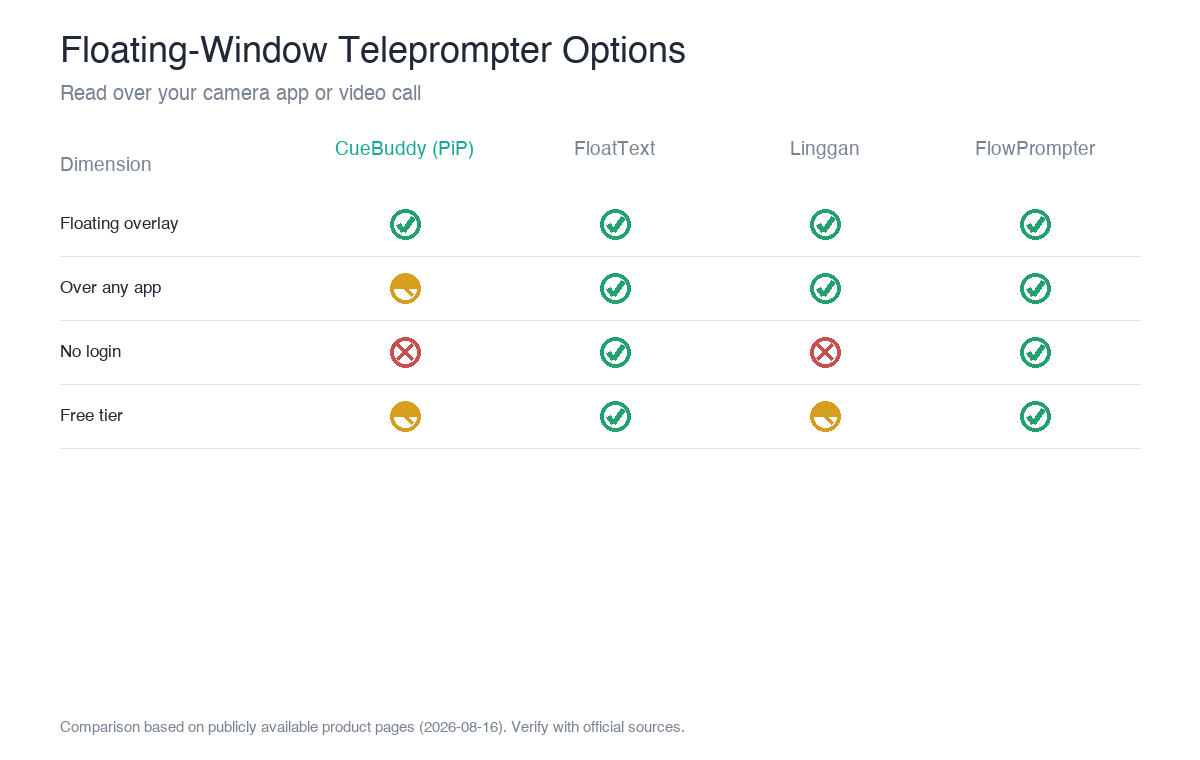
| Option | Floating overlay | Over any app | Login required | Voice following |
|---|---|---|---|---|
| CueBuddy (PiP) | ✅ Picture-in-picture | Partial (system-dependent) | No | ✅ |
| FloatText | ✅ Floating window | ✅ | No | ❌ |
| Linggan | ✅ Floating window | ✅ | Yes | ✅ |
| FlowPrompter | ✅ Transparent overlay | ✅ (desktop) | Free tier no | ❌ |
Practical workflows
Workflow A: Floating bubble + beauty camera
Using CueBuddy (Pro PiP) or FloatText:
1. Paste your script, set font size and scroll speed. 2. Enable the floating window / PiP and drag it near the front camera. 3. Open your beauty camera app and start recording.
Tip: keep the bubble small and place it close to the front camera so eye-line stays natural.
Workflow B: Beam-splitter rig + mirror mode
For DSLR/mirrorless cameras, you don't necessarily need a floating window. Any teleprompter with mirror mode (text horizontally flipped) works with a beam-splitter rig. CueBuddy, Linggan, and FlowPrompter all support mirroring.
Workflow C: Desktop live stream + transparent overlay
FlowPrompter's transparent overlay stays visible over Zoom/OBS even during screen sharing. CueBuddy Web does not currently offer transparent overlay, but the app's PiP can cover some desktop scenarios.
Things to watch
- Permission: the first time you enable a floating window, the system will ask for "draw over other apps" permission. You must grant it.
- Position: place the window as close to the front camera as possible so viewers don't notice your eyes moving.
- Stability: system-level floating windows can be killed by aggressive battery management. Record a 10-second test before an important take.
Final note
A floating window solves the "read while filming" problem, but the underlying prompter still needs to be readable. Prioritize stable floating, good voice following, and no unnecessary login when choosing.
FAQ
Does a floating teleprompter affect video quality?
Not directly—the floating window is just a layer of text over your camera app. What really affects the result is how readable the prompter itself is (font size, scrolling, whether it follows your voice). Pick a combo with stable floating and good voice following; image quality is decided by your camera app.
Which scenarios truly need a floating teleprompter?
When the camera app you use has no built-in prompter—for example, shooting directly with the stock camera, a live-streaming app, or certain short-video apps. A floating teleprompter overlays your script on any app, giving you "read while filming." If your camera app already has a built-in prompter, you may not need the floating window.
Can a floating window and voice following be used together?
Yes—and it's the best combination. The floating window puts the script over your footage, and voice following makes the script follow your mouth. CueBuddy's PiP floating plus voice following is exactly that combo: read while filming, scrolls as you read, waits when you stop.
What's the easiest way to read a script while filming on iPhone?
Two approaches: use a camera app with a built-in prompter (prompting and recording in one), or use a floating/PiP-capable prompter over your favorite camera app. The latter is more flexible—pick a prompter with good voice following and no login, and you can swap camera apps freely.
> Practice first in CueBuddy free online teleprompter; use the app's PiP for actual filming.
> This article is a product comparison compiled by CueBuddy from publicly available information to help readers choose based on their needs. It does not constitute any disparagement or evaluation conclusion of third parties. Prices and features are subject to change and should be verified against each product's official latest information. CueBuddy is not affiliated with or endorsed by any other product mentioned, and respective trademarks belong to their owners. Data organized from public product pages as of 2026-08-16.
Try the free online teleprompter first
If you are solving script, pacing, line-memory, or filming workflow issues, open the browser teleprompter first and test the script there. Use the CueBuddy app when you need a stronger mobile recording workflow.
Start your next recording with CueBuddy
Try the free teleprompter workflow first, then open CueBuddy if you need stronger recording and camera workflows.