 CueBuddy
 Scan with your phone to download
You want to record a talking-head video, an online course, or rehearse a speech. You open the App Store, search for "teleprompter," and get dozens of results with high ratings and prices ranging from free to lifetime purchases. Which one is actually good?
We looked at 30+ teleprompter apps across Chinese and English markets, picked 11 representative options, and grouped them by real use cases: lightweight, voice-following, all-in-one, and regional leaders.
Quick verdict
- Want lightweight, privacy-first, multilingual voice following with a free web trial → CueBuddy.
- English news/speaking where read-tracking accuracy matters most → PromptSmart Pro.
- Need a full talking-head video pipeline → BIGVU or Kaipai.
- Cross-device pro prompting + remote control → Teleprompter.com.
- Just need a floating window over your camera app → FloatText or Linggan.
- Want to try before downloading → CueBuddy free online teleprompter.
What we compared
- Lightweight: app size, login requirements, and whether ads slow you down.
- Voice following: can it scroll as you speak and pause when you stop?
- Recording & ecosystem: in-app recording, mirroring, floating window, and export limits.
- Best for: solo creators, course instructors, live streamers, professional speakers.
11 teleprompters at a glance
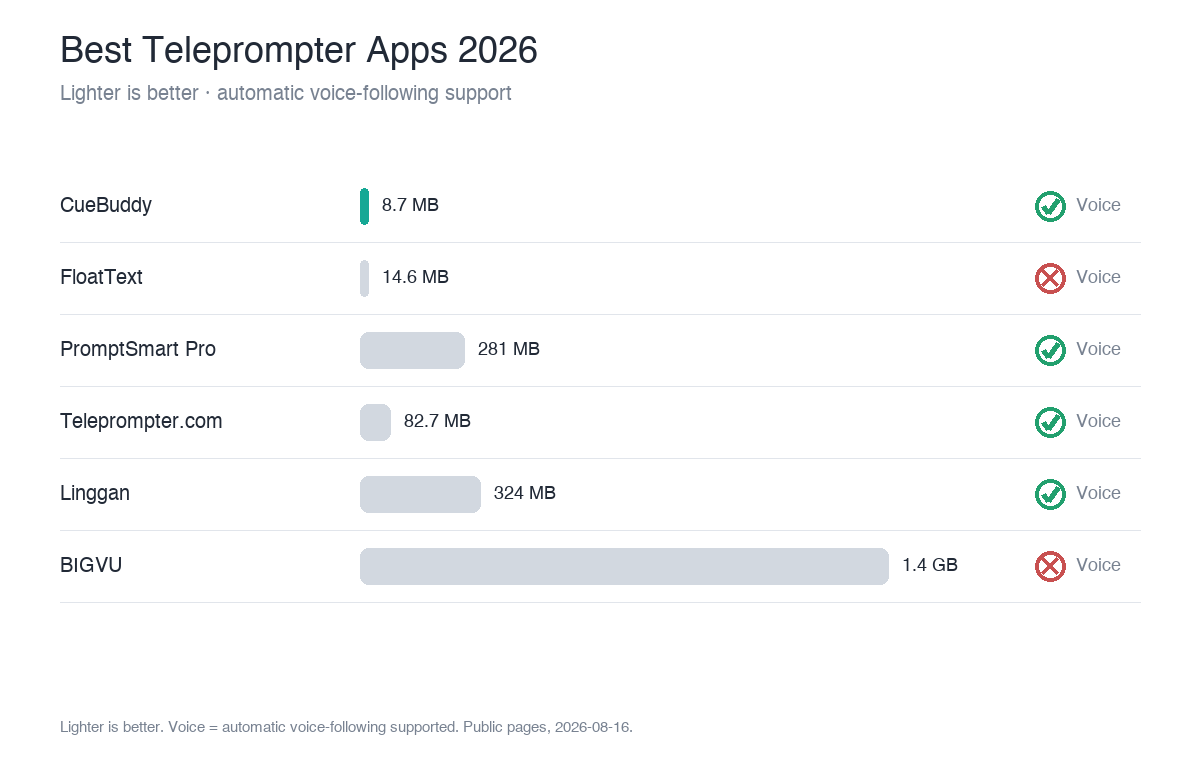
| App | Platforms | Voice following | Size | Typical price | Positioning |
|---|---|---|---|---|---|
| CueBuddy | iOS·Mac·Web(free) | ✅ On-device, offline, multilingual | 8.7 MB | $7.99/mo · $29.99/yr · $79.99 lifetime | Lightweight, privacy-first, voice-following |
| PromptSmart Pro | iOS·Android | ✅ (English-optimized) | 281 MB | $29.99 buyout | Voice-track patent |
| BIGVU | iOS·Android·Web | △ | 1.4 GB | Free + $19/mo | All-in-one video studio |
| Teleprompter.com | iOS·Android·Mac·Web | ✅ (4 modes) | 82.7 MB | Free + $19.99/mo | Cross-platform pro |
| Linggan | iOS | ✅ | 324 MB | ¥39/mo · ¥298 lifetime | Full-featured local leader |
| Kaipai (Meitu) | iOS·Android | ❌ | 384 MB | Free with paid tiers | Short-video factory |
| FloatText | iOS | ❌ | 14.6 MB | Free + in-app | Floating-window focused |
| Teleprompter (Apps Ltd) | iOS | ❌ | 68 MB | $159.99 buyout | Classic UK prompter |
| SpeakFlow | Web | △ | — | Free + $15/mo | Browser voice flow |
| CuePrompter | Web | ❌ | — | 100% free | Plain browser prompter |
| FlowPrompter | Desktop·Mobile·Web | ❌ | — | Free + Pro | Transparent overlay |
> Full data from our internal Teleprompter App Deep Research Report (31 apps sampled). Prices and features vary by region and version; verify on the official store page before publishing.
By category
Voice-following tier
Truly automatic voice following is rare. CueBuddy uses on-device Apple speech recognition, works offline, and performs well across multiple languages including English and Mandarin. PromptSmart Pro's VoiceTrack patent can detect when you deviate from the script and wait for you, but it is optimized primarily for English. Teleprompter.com's VoiceGlide is one of four scroll modes and works cross-platform. BIGVU's voice feature is more of a manual + voice assist, not true read-paced scrolling.
All-in-one tier
BIGVU and Kaipai are built around the entire video workflow: prompt → record → edit → captions → AI scriptwriting → team review. The trade-off is size (BIGVU is 1.4 GB), login requirements, and free-tier watermarks or time limits. Great for one-person studios, less ideal if you just want to read cleanly.
Regional-leader tier
Linggan has 220,000+ ratings, Kaipai brings Meitu's ecosystem, and FloatText weighs only 14.6 MB. Linggan is feature-rich but requires login; FloatText does one thing (floating window) extremely lightly. CueBuddy's web version stands out as a rare "no login, no install, local recording, no data collection" free option.
Pick by use case
- Solo creator / course recording, natural delivery → CueBuddy (voice following + 8.7 MB + no login).
- English news / speeches where tracking matters → PromptSmart Pro (VoiceTrack patent).
- Full talking-head production pipeline → BIGVU or Kaipai.
- Cross-device pro prompting + remote control → Teleprompter.com.
- Floating window over short-video apps → FloatText or Linggan.
- Just want to test a script quickly → CueBuddy free web version.
Final note
There is no single "best" teleprompter—only the one that best fits your workflow. If you want lightweight, privacy-clean, multilingual voice following, and a free web trial, start with CueBuddy free online teleprompter and decide later if you need the app.
FAQ
Is a free teleprompter enough, or do I need a paid one?
It depends on your core needs. If you only read scripts occasionally and don't demand much from voice following, free options (like CueBuddy's web version or CuePrompter) are enough. If you want "scrolls as you read, waits when you stop" automatic voice following, offline use, and multiple languages, a paid voice-following app saves a lot of hassle. Try the free web version first, then decide whether to pay.
Is voice following worth paying extra for?
If you regularly record talking-head videos, courses, or speeches, yes. Voice following makes the script move at your pace—pauses and re-reads stay in sync—which is far easier than manually tuning scroll speed. It's one of the most valuable teleprompter capabilities in 2026. For occasional use, a free fixed-speed prompter will do.
Does app size really matter for a teleprompter on my phone?
It matters if you open it daily. An 8.7 MB CueBuddy and a 1.4 GB BIGVU differ completely in download friction, launch speed, and storage footprint. If you only use it occasionally, size matters less; if you use it every day, a lightweight app is noticeably better.
How do I choose between Chinese-market and international teleprompters?
Look at your language and workflow. If you work mainly in Chinese and want localized features (digital avatar, AI lipsync), go with local options like Linggan or Kaipai. If you need multilingual support, clean privacy, and offline use, CueBuddy is the more balanced pick. For pure English presentations and broadcasts, PromptSmart Pro's English tracking is the strongest.
> This article is a product comparison compiled by CueBuddy from publicly available information to help readers choose based on their needs. It does not constitute any disparagement or evaluation conclusion of third parties. Prices and features are subject to change and should be verified against each product's official latest information. CueBuddy is not affiliated with or endorsed by any other product mentioned, and respective trademarks belong to their owners. Data organized from public product pages as of 2026-08-16.
Try the free online teleprompter first
If you are solving script, pacing, line-memory, or filming workflow issues, open the browser teleprompter first and test the script there. Use the CueBuddy app when you need a stronger mobile recording workflow.
Start your next recording with CueBuddy
Try the free teleprompter workflow first, then open CueBuddy if you need stronger recording and camera workflows.