 CueBuddy
 Scan with your phone to download
Linggan is one of the highest-rated teleprompters in the Chinese market: 220,000+ ratings and a 4.9 average. It is feature-rich to the point of being a Swiss Army knife. CueBuddy, a newer option, has gained traction by offering a free web version, on-device voice-following, and no login. How do they compare for local creators?
One-line positioning
- CueBuddy: lightweight, privacy-first, offline multilingual voice-following with a free web entry point.
- Linggan: full-featured local leader with floating window, digital avatar, and AI lipsync.
Side-by-side comparison
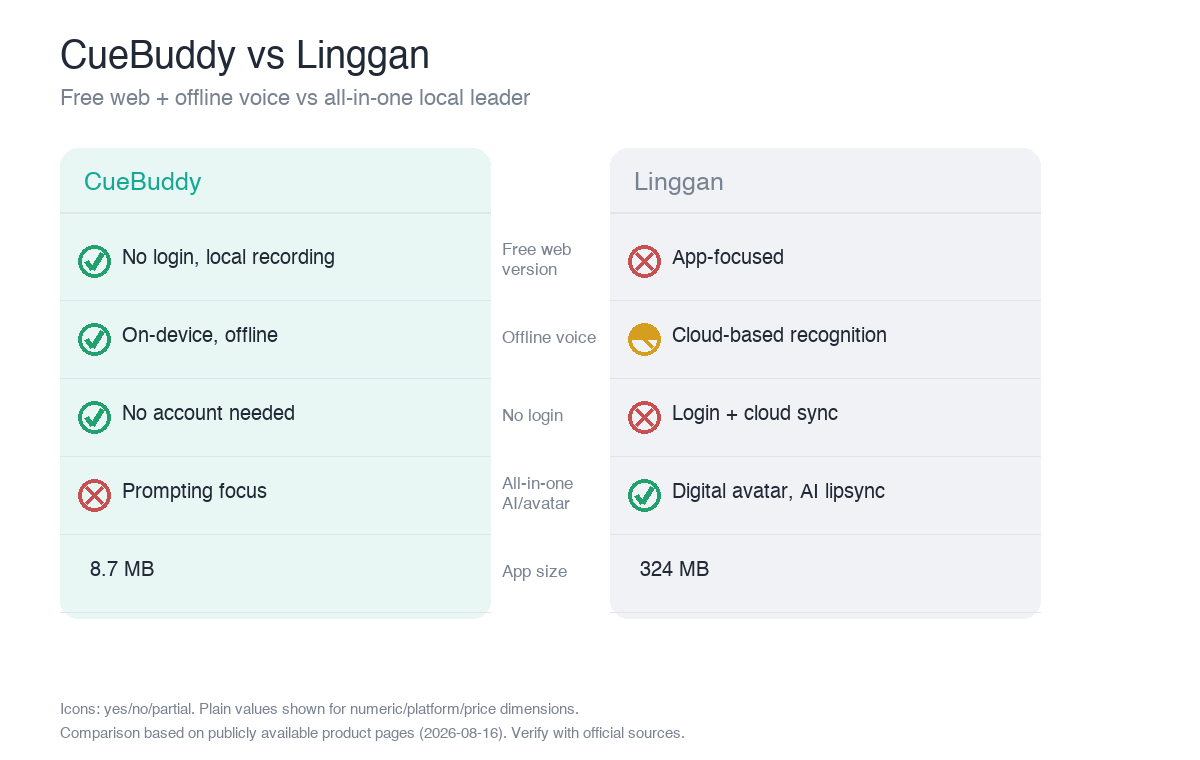
| Dimension | CueBuddy | Linggan |
|---|---|---|
| Voice following | ✅ On-device, offline, multilingual | ✅ |
| Floating window | ✅ (Pro) | ✅ |
| Free web version | ✅ No login · local recording | ❌ (app-focused) |
| Recording | ✅ App + browser local | ✅ Record while prompting |
| Script import | ✅ | ✅ |
| Digital avatar / AI lipsync | ❌ | ✅ (charged per minute) |
| App size | 8.7 MB | 324 MB |
| Login / privacy | No login · no data collected | Login + cloud sync |
| Price | $7.99/mo · $29.99/yr · $79.99 lifetime | ¥39/mo · ¥298 lifetime (AI extras separate) |
Three core differences
1. Free entry shape
CueBuddy has a standalone free web teleprompter (cuebuddy.cn/en/online-teleprompter.html) with no login, local recording, and no data collection. Linggan is app-first: deep features, but the first use requires login and cloud sync. If you want to try without registering, CueBuddy is more direct.
2. Voice-following engine
Both support voice following, but CueBuddy uses Apple on-device recognition and works offline—no network needed. Linggan relies more on cloud or online recognition, which limits offline scenarios. For outdoor or weak-signal shooting, this matters.
3. Feature breadth vs focus
Linggan wins on breadth: digital avatar, AI lipsync, script writing, and beauty filters (AI lipsync charged separately). CueBuddy wins on focus: prompting, voice-following, and recording at 8.7 MB, no login, no ads, no data collection. Choose breadth or choose lightness.
Pros and cons
- CueBuddy: free web trial, offline read-paced scrolling, no login, 8.7 MB, privacy-clean.
- Cons: no digital avatar or AI lipsync; less feature breadth than Linggan.
- Linggan: most complete feature set, strong ratings, floating window, digital avatar, AI features, low lifetime price.
- Cons: login required; larger app size; AI features have separate charges; offline tracking is limited.
Who should choose which
- Choose CueBuddy if you want a free web trial, offline voice following, no login, no data collection, and a lightweight, focused experience.
- Choose Linggan if you want a one-stop "prompt + digital avatar + AI lipsync + script writing" workflow and are okay with login and separate AI charges.
FAQ
Which is better value, Linggan or CueBuddy?
It depends on what you want. Linggan is ¥39/mo or ¥298 lifetime (China-only pricing), but advanced features like the AI digital avatar and lipsync are charged separately. CueBuddy is $7.99/mo · $29.99/yr · $79.99 lifetime, plus a free web version. If you only need prompting and voice following, CueBuddy has the lower barrier; if you want the full digital-avatar pipeline, Linggan is more complete but the total spend may end up higher.
Are Linggan's AI digital avatar and lipsync worth paying extra for?
If you make virtual-presenter videos and don't want to appear on camera, yes—that's Linggan's differentiating capability. If you appear on camera yourself and just need to read without stumbling, you won't use those features. CueBuddy takes prompting to the extreme, and that's enough—no need to pay for AI you won't use.
Do both require login?
Linggan requires login for its cloud features. CueBuddy needs no login, works on-device and offline, and iCloud sync is optional. If you care about privacy and don't want to register, CueBuddy is cleaner.
Which has stronger Chinese voice following?
Both support Chinese. CueBuddy uses Apple on-device recognition, works offline, and needs no login. Linggan is more feature-complete (prompting + digital avatar + AI scriptwriting) but relies mainly on the cloud. Comparing purely on the Chinese voice-following experience, CueBuddy is more focused; if you want the full bundle, Linggan is more complete.
> Don't want to register first? CueBuddy free web teleprompter works without an account.
> This article is a product comparison compiled by CueBuddy from publicly available information to help readers choose based on their needs. It does not constitute any disparagement or evaluation conclusion of third parties. Prices and features are subject to change and should be verified against each product's official latest information. CueBuddy is not affiliated with or endorsed by any other product mentioned, and respective trademarks belong to their owners. Data organized from public product pages as of 2026-08-16.
Try the free online teleprompter first
If you are solving script, pacing, line-memory, or filming workflow issues, open the browser teleprompter first and test the script there. Use the CueBuddy app when you need a stronger mobile recording workflow.
Start your next recording with CueBuddy
Try the free teleprompter workflow first, then open CueBuddy if you need stronger recording and camera workflows.