 CueBuddy
 Scan with your phone to download
Sometimes you just need to read a script once without installing an app or creating an account. That's where online teleprompters come in. But the differences are bigger than you'd expect: some require login, some only auto-scroll at a fixed speed, and some send your recording through their servers.
CueBuddy's free web version (cuebuddy.cn/en/online-teleprompter.html) is built around "open and go." How does it compare to SpeakFlow, Teleprompter.com, CuePrompter, FlowPrompter, and VoicePrompter?
Three pass/fail checks
1. Login required? If you have to register, your scripts and habits live on someone else's server. 2. True voice following? Fixed-speed scrolling is not the same as "read-paced, pause-when-you-stop" voice following. 3. Local recording? If the recording leaves your browser, that's a privacy consideration.
CueBuddy Web vs the field
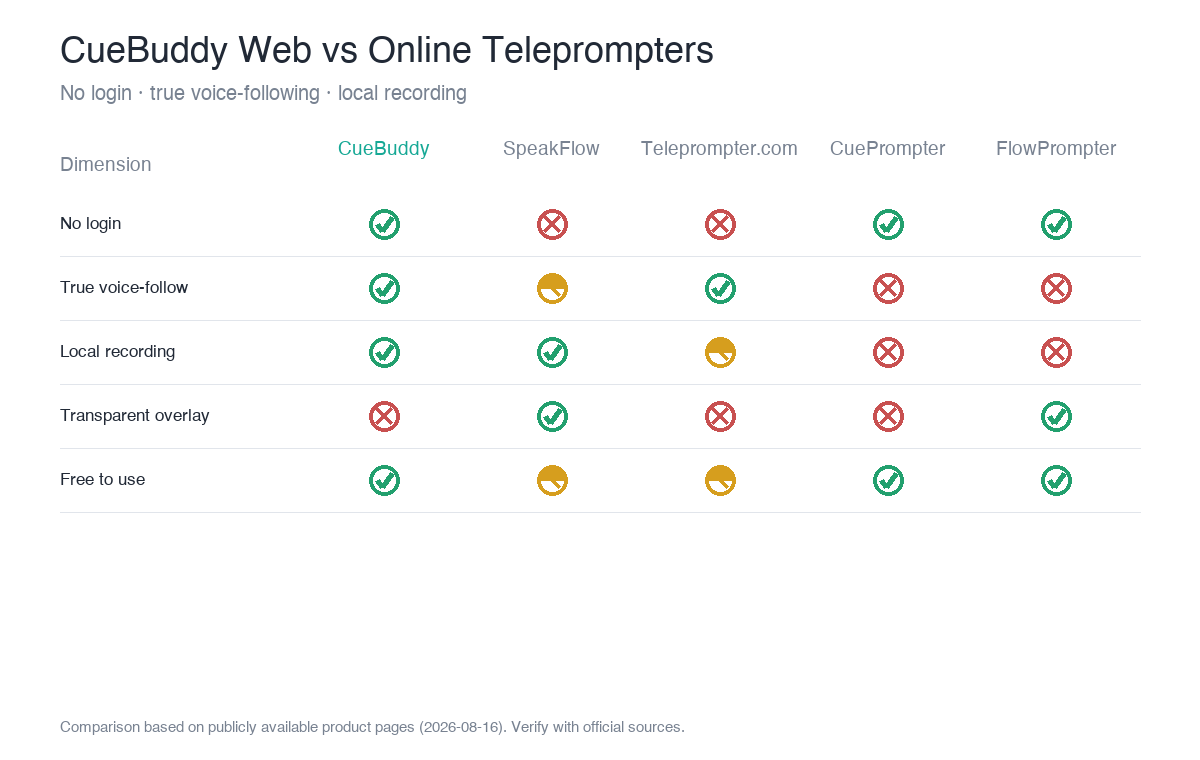
| Dimension | CueBuddy Web | SpeakFlow | Teleprompter.com | CuePrompter | FlowPrompter | VoicePrompter |
|---|---|---|---|---|---|---|
| No login | ✅ | ❌ (account to save scripts) | ❌ (account required) | ✅ | Free tier ✅ | ✅ |
| True voice following | ✅ (browser, multilingual) | △ (limited on free tier) | ✅ (one of 4 modes) | ❌ | ❌ (overlay focused) | ✅ |
| Mirroring | ✅ | ✅ (paid) | ✅ | ✅ | ✅ | ✅ |
| Local recording | ✅ (no server) | ✅ (browser-based) | ✅ (watermarked on free) | ❌ | — | — |
| Transparent overlay | ❌ (PiP is in the app) | ✅ Overlay | ❌ | ❌ | ✅ (unique) | ❌ |
| Price | Free core flow | Free limited · Plus $15/mo | Free watermarked · Pro $19.99/mo | 100% free | Free + Pro | Free (open source) |
| Native app | ✅ iOS·Mac | ❌ (web only) | ✅ | ❌ | ✅ desktop/mobile | ❌ (PWA) |
> EasyPrompter (free, offline-capable, voice recognition scroll mode, no login) and FluidPrompter (free forever, multi-screen sync, true mirroring, hardware remote, no voice following) are also in this space. Data organized from public pages as of 2026-08-16.
Three core differences
1. The "free + no login + true voice following" combination is rare
CuePrompter is fully free but only supports fixed-speed scrolling. SpeakFlow's Flow voice following is limited on the free tier and requires an account to save scripts. Teleprompter.com's free tier is watermarked and 1080p-limited. CueBuddy's web version is one of the few that lets you open the page, paste a script, and use true voice following without logging in, while keeping recordings local.
2. Transparent overlay is FlowPrompter's unique strength
FlowPrompter can overlay a transparent script on top of Zoom, OBS, or any other app, so you can still read while screen-sharing. Pure web "full-screen text" prompters can't do that. CueBuddy's floating PiP is in the app (Pro); the web version currently offers full-screen / windowed + mirroring. If transparent overlay is your main need, FlowPrompter is worth testing; if you just need to read a script, CueBuddy's zero-install approach is simpler.
3. CueBuddy's unique edge is three-platform continuity
Most online-only competitors stop at the browser. CueBuddy gives you "web free trial → iOS / Mac app upgrade" with the same voice-following engine. You can validate the experience at zero cost, then move to the app if you need PiP, portrait blur, or advanced recording.
Pros and cons
- CueBuddy Web: no login, local script management; see the privacy policy for data handling, multilingual voice following, local recording, three-platform continuity.
- Cons: no transparent overlay in the browser; voice following depends on browser capabilities; offline availability depends on browser/system.
- SpeakFlow: polished UI, Flow voice following, team collaboration, browser recording.
- Cons: free tier voice limits, login required, paid upgrades.
- Teleprompter.com: strong brand, cross-platform, mature remote-control ecosystem.
- Cons: account required, free watermarked/1080p, relatively expensive subscription.
- CuePrompter: 100% free, zero setup, no watermark.
- Cons: no voice following, no script saving, requires network.
- FlowPrompter: unique transparent overlay, desktop offline mode, script management.
- Cons: no true voice following, app install needed for overlay.
- VoicePrompter: free, true voice following, privacy-focused, PWA offline.
- Cons: web-first, weak native app.
Who should choose which
- Zero registration, open and read, local recording → CueBuddy Web.
- Screen-share while reading (live/meeting) → FlowPrompter transparent overlay, or CueBuddy app PiP (Pro).
- Simplest fixed-speed scrolling → CuePrompter.
- Already inside an ecosystem, need team features → SpeakFlow / Teleprompter.com.
FAQ
Web teleprompter vs app—which is better?
It depends on the scenario. For quick script tests, avoiding downloads, and opening on any device, a web version is lighter. For long-term heavy use, offline work, floating windows, and system-level recording, an app is stronger. CueBuddy offers both—the web version is free with zero barrier, and the app is more full-featured.
Do all online teleprompters require registration?
No. CueBuddy Web works the moment you open it—no signup or login—and CuePrompter is also pure web with no login. Cloud-based tools like SpeakFlow and Teleprompter.com require accounts. If "use it without registering" matters to you, prefer the no-login options.
Can a web teleprompter record?
It depends on the product. CueBuddy Web supports local recording—once you grant camera and microphone access, files download straight to your device. Some plain fixed-speed web prompters only scroll text and don't record at all. If you want to "read while recording," pick a web version with local recording.
Are there hidden limits in free online teleprompters?
Common limits include duration caps, watermarks, resolution ceilings, or forced login. CueBuddy Web is free, no login, no watermark, with local recording; some products' free tiers add time limits or watermarks. Before choosing, check whether "free" comes with a watermark or a time cap.
> Try it now: CueBuddy free online teleprompter opens in the browser with voice following.
> This article is a product comparison compiled by CueBuddy from publicly available information to help readers choose based on their needs. It does not constitute any disparagement or evaluation conclusion of third parties. Prices and features are subject to change and should be verified against each product's official latest information. CueBuddy is not affiliated with or endorsed by any other product mentioned, and respective trademarks belong to their owners. Data organized from public product pages as of 2026-08-16.
Try the free online teleprompter first
If you are solving script, pacing, line-memory, or filming workflow issues, open the browser teleprompter first and test the script there. Use the CueBuddy app when you need a stronger mobile recording workflow.
Start your next recording with CueBuddy
Try the free teleprompter workflow first, then open CueBuddy if you need stronger recording and camera workflows.