 CueBuddy
 Scan with your phone to download
Teleprompter.com has an obvious advantage before you even open the app: it owns the teleprompter.com domain and is one of the highest-rated teleprompters available (100,000+ five-star ratings). CueBuddy is a newer entrant that has pushed multilingual voice-following, privacy, and a free web version to the front. For multilingual creators, the choice is not obvious.
One-line positioning
- CueBuddy: lightweight, privacy-first, multilingual voice-following with a free web version and no login.
- Teleprompter.com: cross-platform pro teleprompter with iOS, Android, Mac, and Web, plus a mature remote-control ecosystem.
Side-by-side comparison
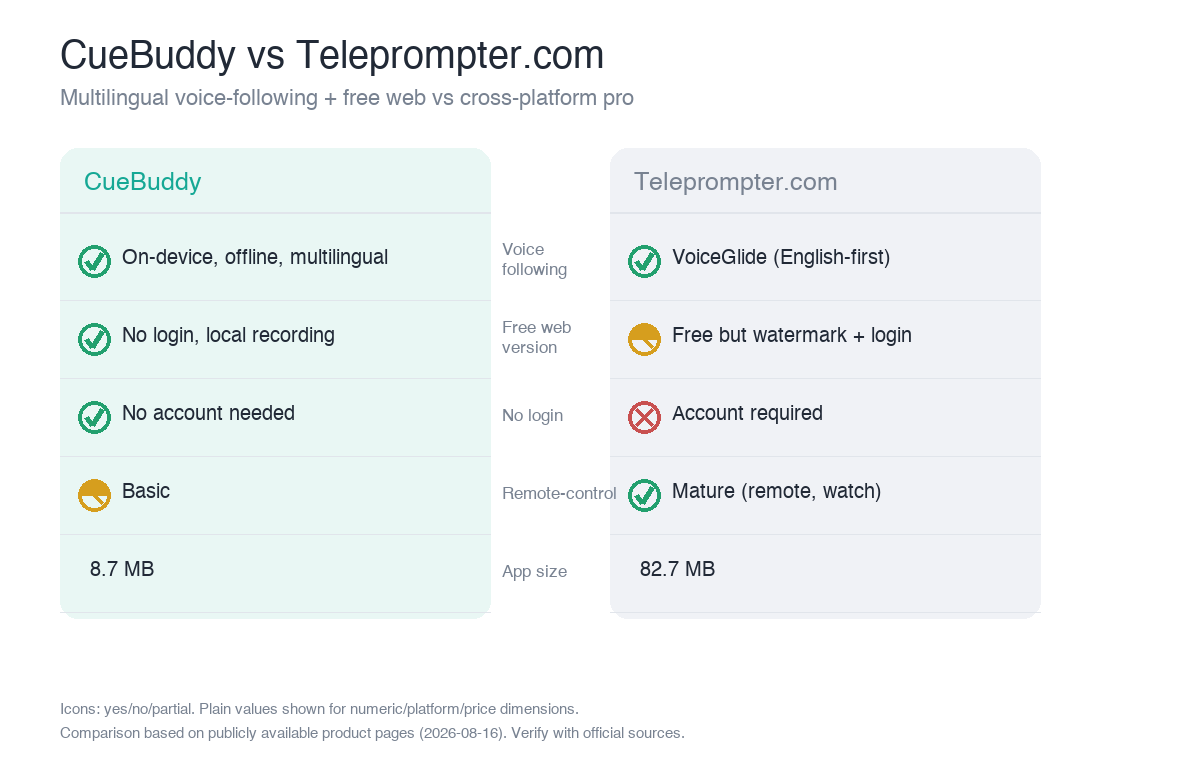
| Dimension | CueBuddy | Teleprompter.com |
|---|---|---|
| Voice following | ✅ On-device, offline, multilingual | ✅ VoiceGlide (one of 4 modes) |
| Platforms | iOS·iPad·Mac·Web(free) | iOS·Android·Mac·Web |
| Floating / PiP | ✅ (Pro) | ❌ |
| Recording | ✅ App + browser local recording | ✅ (free export watermarked / 1080p limit) |
| Remote-control ecosystem | Basic | ✅ Mature (remote, watch) |
| App size | 8.7 MB | 82.7 MB |
| Login / privacy | No login · no data collected | Account required |
| Price | $7.99/mo · $29.99/yr · $79.99 lifetime | Free Starter + Pro $19.99/mo (~$89.99/yr) |
Three core differences
1. Multilingual voice following
CueBuddy's on-device recognition is tuned for multiple languages and works offline; English and Mandarin both test naturally. Teleprompter.com's VoiceGlide is one of four scroll modes and works consistently across platforms, but the workflow is English-first and relies on network and account access.
2. Free-entry friction
CueBuddy's web version is fully free, no login, local recording, and no data collection—you can experience the core flow without installing anything. Teleprompter.com has a free Starter, but exports are watermarked and limited to 1080p; full features require Pro.
3. Pro ecosystem vs lightweight privacy
Teleprompter.com has a more mature remote-control ecosystem (dedicated remote, Apple Watch) and is better suited to studio hardware setups. CueBuddy wins on 8.7 MB size, no login, and no data collection, making it ideal for independent creators who want minimal friction.
Pros and cons
- CueBuddy: strong multilingual voice following, offline, free web trial, no login, privacy-clean, lightweight.
- Cons: remote-control ecosystem is more basic; floating window is Pro.
- Teleprompter.com: cross-platform consistency, mature remote control, strong brand and ratings.
- Cons: English-first workflow; account required; free tier is watermarked/1080p; subscription is relatively expensive (~$89.99/yr).
Who should choose which
- Choose CueBuddy if you record in multiple languages, want a free web trial, offline read-paced scrolling, no login, and lightweight privacy.
- Choose Teleprompter.com if you need robust remote control and studio hardware integration and your workflow is primarily English.
FAQ
Both support voice following—what's the real difference?
Mainly language focus and ecosystem. CueBuddy runs on-device and offline with multilingual support (English and Mandarin both test naturally). Teleprompter.com's VoiceGlide is one of four scroll modes, built around an English-first workflow that relies on account connectivity. For multilingual use and offline work, choose CueBuddy; for an English-language pro studio, choose Teleprompter.com.
Is Teleprompter.com's remote control useful for me?
It's useful if you run a multi-camera studio, use hardware remotes, or prompt for a team—that's its professional strength. If you only record solo talking-head videos or courses, you'll rarely use remote control, and CueBuddy's lightweight voice following is more direct.
How should Chinese-speaking users choose between the two?
Prefer CueBuddy. Its on-device recognition is friendlier to Chinese and other languages, with no login and offline availability. Teleprompter.com is built around English workflows, and the Chinese experience plus the login requirement is less smooth than CueBuddy for Chinese-speaking users.
Does cross-device sync matter?
It depends on whether you shoot across multiple devices. CueBuddy syncs scripts via iCloud across iPhone, iPad, and Mac, and there's a free web version you can open anywhere. Teleprompter.com syncs across platforms but requires an account. If you value the privacy of "sync without logging in," CueBuddy is more comfortable.
> Multilingual creators can test CueBuddy free online teleprompter at zero cost.
> This article is a product comparison compiled by CueBuddy from publicly available information to help readers choose based on their needs. It does not constitute any disparagement or evaluation conclusion of third parties. Prices and features are subject to change and should be verified against each product's official latest information. CueBuddy is not affiliated with or endorsed by any other product mentioned, and respective trademarks belong to their owners. Data organized from public product pages as of 2026-08-16.
Try the free online teleprompter first
If you are solving script, pacing, line-memory, or filming workflow issues, open the browser teleprompter first and test the script there. Use the CueBuddy app when you need a stronger mobile recording workflow.
Start your next recording with CueBuddy
Try the free teleprompter workflow first, then open CueBuddy if you need stronger recording and camera workflows.