 CueBuddy
 Scan with your phone to download
The world's first teleprompter's core components: a toilet paper roll and an electric motor.
In 1948, CBS actor Fred Barton Jr. couldn't memorize all his lines. He went to company engineer Irving Kahn for help. Kahn took a cardboard roll — the kind used for toilet paper — wrote the script on a long strip of paper, and rigged a motor to rotate the roll at a steady speed. The actor read as the paper scrolled. When one roll finished, they swapped in the next.
They called this contraption the "TelePrompTer" — a brand name that, like "Jeep" or "Kleenex," eventually became the word for the entire category.
From Paper Scrolls to Glass: The Optical Revolution
The paper scroll had an obvious flaw: the performer had to look down to read. The audience could tell you were "reading," not "speaking."
In the 1950s, the beamsplitter mirror changed the game.
The principle: insert a semi-transparent glass at a 45-degree angle between the camera and the lens. Light passes straight through (the camera captures you clearly), but the glass also reflects light from below (you read text reflected from a screen beneath).
The 45-degree angle is key. Too shallow, and the reflected text is unreadable. Too steep, and the glass obstructs the camera. At 45 degrees, everything works — crisp text for you, crystal-clear image for the camera.
This is the exact design in every professional studio today. Over seventy years later, the core optical principle hasn't changed.
From the 1950s through the 1980s, teleprompter evolution focused on one question: "how do we display the text?" Hand-written paper scrolls → typewritten scrolls → small CRT monitors. A foot pedal controlled speed — press to scroll, release to stop. Operating the teleprompter was a dedicated job: the "prompter operator."
Computers Arrive: The Teleprompter Goes Soft
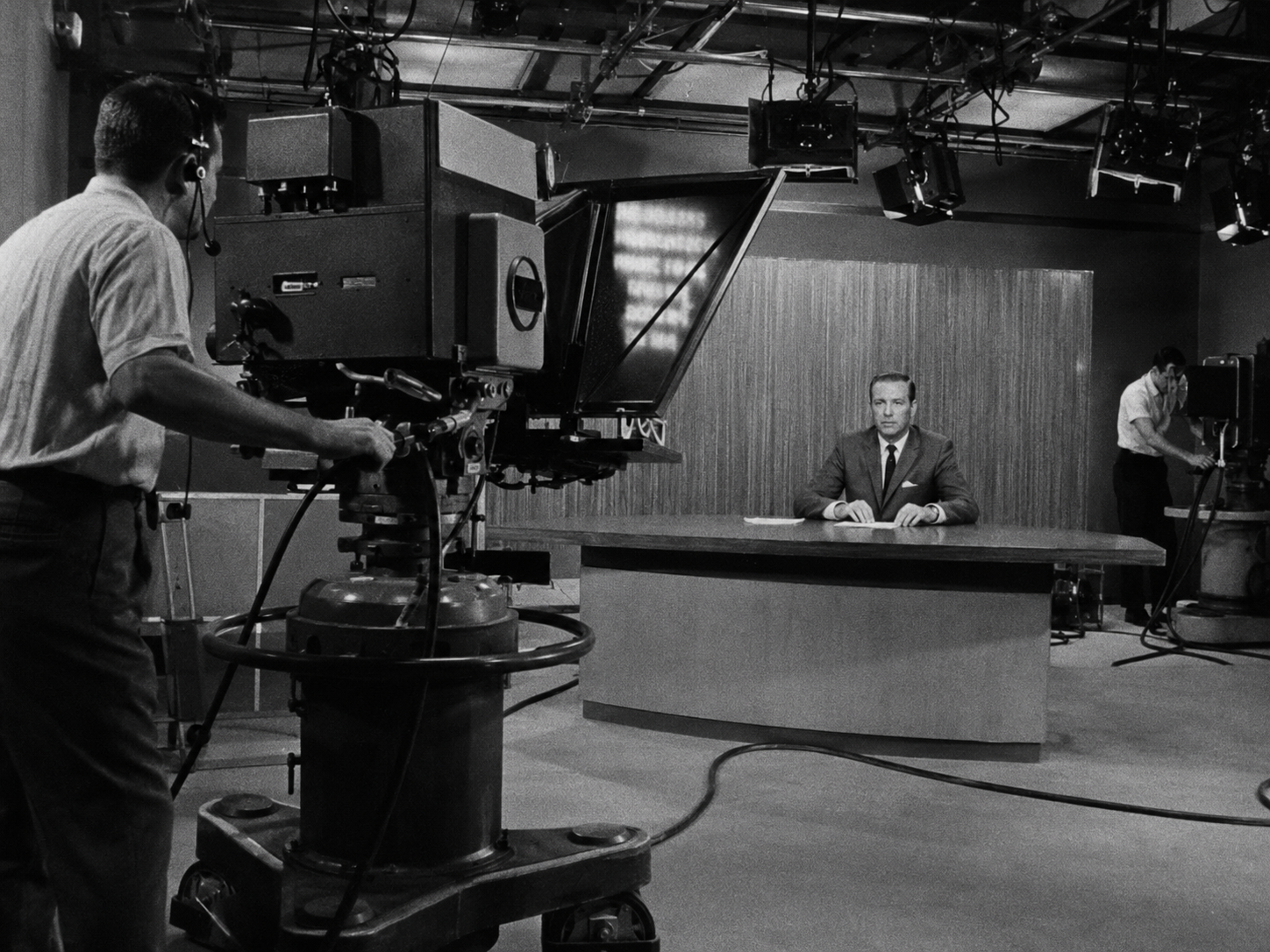
In the late 1980s, personal computers entered TV production workflows. The teleprompter's "screen" shifted from a dedicated monitor to a computer display. Content went from pre-printed to editable in real time.
This change was bigger than it looked. Before, once a script was printed, it was locked. If the anchor discovered a problem mid-read, they had to power through. Now, an editor in the control room could make changes on the fly — delete a paragraph, add a line, reorder sections — in seconds.
By the 1990s, software-based teleprompters were mature. Dedicated prompter software ran on Windows or Mac, supporting font size control, scroll speed adjustment, and dual-screen output. Standard equipment for every newsroom.
The Phone Era: Everyone's an Anchor Now
The iPhone launched in 2007. The iPad in 2010. These two devices changed the teleprompter industry as profoundly as the beamsplitter did in the 1950s.
The reason is simple: your phone already has a high-quality screen, a camera, and a microphone. The three core components a teleprompter needs — all in your pocket.
The earliest teleprompter apps appeared around 2010. Basic functionality: black background, large white text, scrolling bottom to top. Main users: small-team video creators and wedding videographers solving the "client forgot their vows" problem on a budget.
By 2015, teleprompter apps had added Bluetooth remotes, mirror-flip modes, and customizable text colors. But the real watershed came after 2018 — speech recognition technology matured.
Voice Tracking: The Teleprompter's iPhone Moment
Traditional teleprompters had two scroll modes: fixed-speed (set a pace, it scrolls on its own) and manual (remote or foot pedal control).
Both have fatal flaws. Fixed-speed ignores that nobody speaks at a constant rate — pace rises and falls with emotion and content. Manual forces you to split attention between operating a device and delivering a performance.
Voice tracking solves this. The device listens to you speak. Wherever you are in the script, it follows. You speed up, it speeds up. You pause, it stops. You double back, it jumps right back.
On the technical side, speech recognition can run through system services and may support on-device operation for some recognizers and languages. Apple documents that offline capability depends on supportsOnDeviceRecognition; apps must not assume every device and language can recognize speech without a network.
CueBuddy is built on this local recognition approach. As you speak, it scrolls to your position and highlights the exact word you're on — a quick glance tells you precisely where you are. Compared to traditional teleprompters, this is a generational leap.
From "A Piece of Glass" to "A Complete Workflow"
Today's teleprompter is far more than "a piece of glass and a screen." It's a critical node in a content production workflow:
- Write: In Notes, Notion, or directly in the teleprompter app.
- Format: Font size, line spacing, color, mirror flip — these parameters determine reading comfort.
- Record: The teleprompter scrolls while the phone captures video. Picture-in-Picture mode shows both script and camera frame. 4K 60fps, portrait blur — the works.
- Edit: The recorded clip goes straight to your photo library. No export from the prompter, no import into an editor.
Write, record, publish. No "memorize the script" step in between.
Five years ago, this workflow was exclusive to top-tier creators — requiring a dedicated teleprompter rig, an external monitor, and a standalone microphone. Today, a phone and a good teleprompter app can run the entire pipeline.
Over seventy years ago, a piece of glass and a paper-scroll motor served the handful of people who read scripts in TV studios. Today, a lightweight app helps anyone who wants to express themselves well deliver their words, whole and unbroken. That's not just technological evolution. That's democratization.
Try the free online teleprompter first
If you are solving script, pacing, line-memory, or filming workflow issues, open the browser teleprompter first and test the script there. Use the CueBuddy app when you need a stronger mobile recording workflow.
Start your next recording with CueBuddy
Try the free teleprompter workflow first, then open CueBuddy if you need stronger recording and camera workflows.