 CueBuddy
 Scan with your phone to download
BIGVU and CueBuddy both say "teleprompter + recording," but they represent two very different product philosophies: BIGVU wants to be your all-in-one talking-head video studio, while CueBuddy wants to be the quietest, most focused reading screen available.
One-line positioning
- CueBuddy: lightweight, privacy-first voice prompter; 8.7 MB, offline, multilingual.
- BIGVU: all-in-one talking-head factory: prompt → record → edit → captions → AI script → team workflow.
Side-by-side comparison
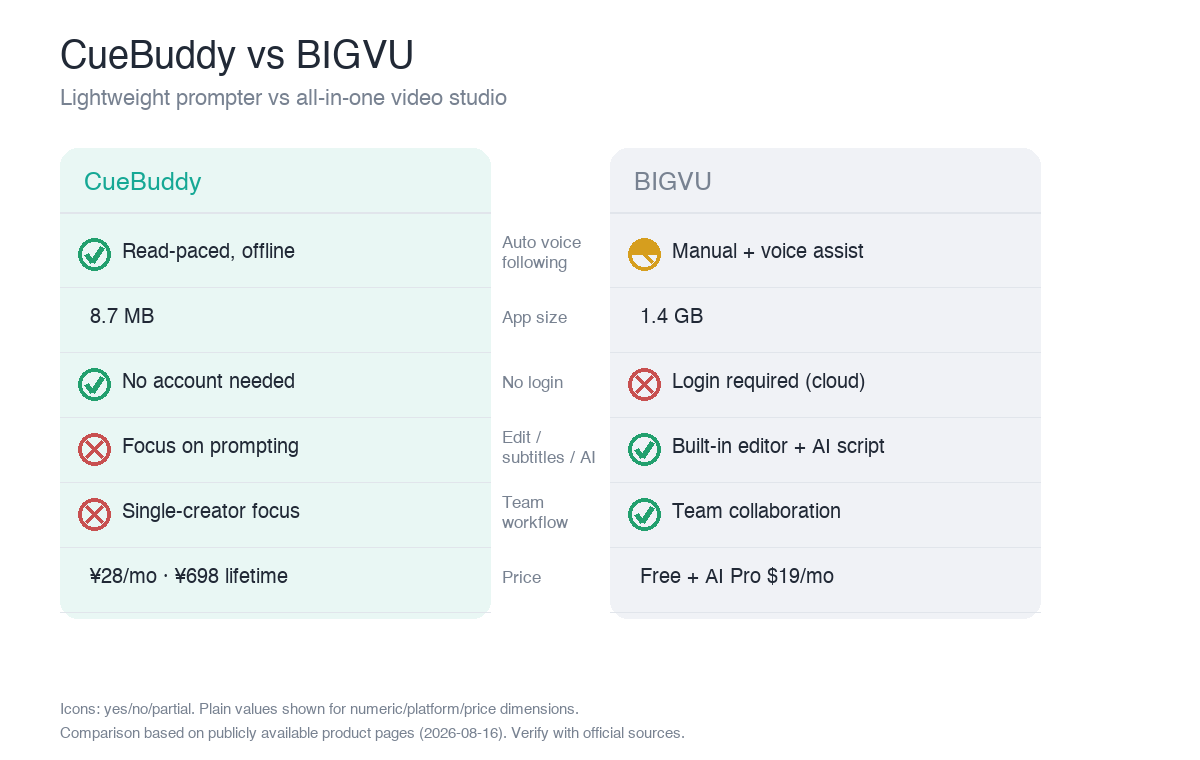
| Dimension | CueBuddy | BIGVU |
|---|---|---|
| Core focus | Lightweight voice prompting | Record + edit + captions + AI script + team |
| Voice following | ✅ On-device, offline, multilingual | △ Manual + voice assist |
| Platforms | iOS·iPad·Mac·Web(free) | iOS·Android·Web |
| Video editing / captions | ❌ (prompting + recording only) | ✅ Built-in |
| AI scriptwriting | ❌ | ✅ |
| Team collaboration | ❌ | ✅ |
| App size | 8.7 MB | 1.4 GB |
| Login | Not required | Required (cloud) |
| Price | $7.99/mo · $29.99/yr · $79.99 lifetime | Free + AI Pro $19/mo (5 tiers) |
Three core differences
1. Size is a statement
CueBuddy is 8.7 MB and opens instantly. BIGVU is 1.4 GB, bundling AI models, templates, and fonts. One has near-zero download friction; the other tests your storage and patience.
2. How "automatic" the voice following is
CueBuddy provides true read-paced scrolling: it speeds up, slows down, and pauses with your actual speech. BIGVU's voice feature is more of a scroll-assist; it does not automatically adjust to your speaking pace in the same way.
3. All-in-one is a trade-off
BIGVU lets you record, edit, caption, generate scripts with AI, and review with a team inside one app. That works well for solo creators acting as a full production team, but the free tier is limited to 9 minutes / 720p with watermark and requires login. CueBuddy hands off editing to your preferred editor and focuses entirely on making the prompting experience light, focused, and private.
Pros and cons
- CueBuddy: extremely light, automatic voice following, offline, no login, privacy-clean, free web trial.
- Cons: no editing, captions, AI writing, or team features; heavy production workflows need additional tools.
- BIGVU: one-stop talking-head production, AI script, captions, team collaboration, 12M+ users.
- Cons: large app size, free tier limits, login required, not true automatic read-paced scrolling.
Who should choose which
- Choose CueBuddy if you already have an editing workflow and just need a prompter that follows your voice without login or bloat.
- Choose BIGVU if you want prompt → shoot → edit → caption → publish in one place and are okay with login and subscription.
FAQ
I just want to read scripts cleanly—do I need all of BIGVU's features?
No. BIGVU is a full "prompt → shoot → edit → captions → AI script" studio, built for a one-person team doing the work of a whole crew. If you already have an editing workflow (CapCut / Premiere) and just need a prompter that never trips you up, a lightweight, focused app like CueBuddy fits better—8.7 MB, no login, more private.
Can CueBuddy and BIGVU be used together?
Yes. Use CueBuddy for the reading part (voice following, offline, lightweight), then hand the footage to CapCut or DaVinci Resolve for post—you don't need BIGVU's all-in-one for that. You only need BIGVU's heavier approach when you want one app to do everything and are fine with login and a subscription.
Is BIGVU's free tier enough?
BIGVU's free tier is limited to 9 minutes, 720p, and a watermark, and it requires login—formal talking-head videos hit those limits fast. By contrast, CueBuddy free web teleprompter is completely free, no login, no watermark—ideal for getting the reading step running smoothly first.
Does the 1.4 GB vs 8.7 MB size gap really matter?
A lot, if your phone storage is tight and you open the app often. The 1.4 GB BIGVU bundles large AI models and templates, so downloading and launching are both heavier; the 8.7 MB CueBuddy downloads and opens almost instantly. If you only need prompting, there's no reason to carry 1.4 GB of features you'll never use.
> Want to test lightweight voice following first? CueBuddy free web teleprompter opens in seconds.
> This article is a product comparison compiled by CueBuddy from publicly available information to help readers choose based on their needs. It does not constitute any disparagement or evaluation conclusion of third parties. Prices and features are subject to change and should be verified against each product's official latest information. CueBuddy is not affiliated with or endorsed by any other product mentioned, and respective trademarks belong to their owners. Data organized from public product pages as of 2026-08-16.
Try the free online teleprompter first
If you are solving script, pacing, line-memory, or filming workflow issues, open the browser teleprompter first and test the script there. Use the CueBuddy app when you need a stronger mobile recording workflow.
Start your next recording with CueBuddy
Try the free teleprompter workflow first, then open CueBuddy if you need stronger recording and camera workflows.